n8n / PROJECT USE CASE
ClickUp Critical Incident Escalation Workflow
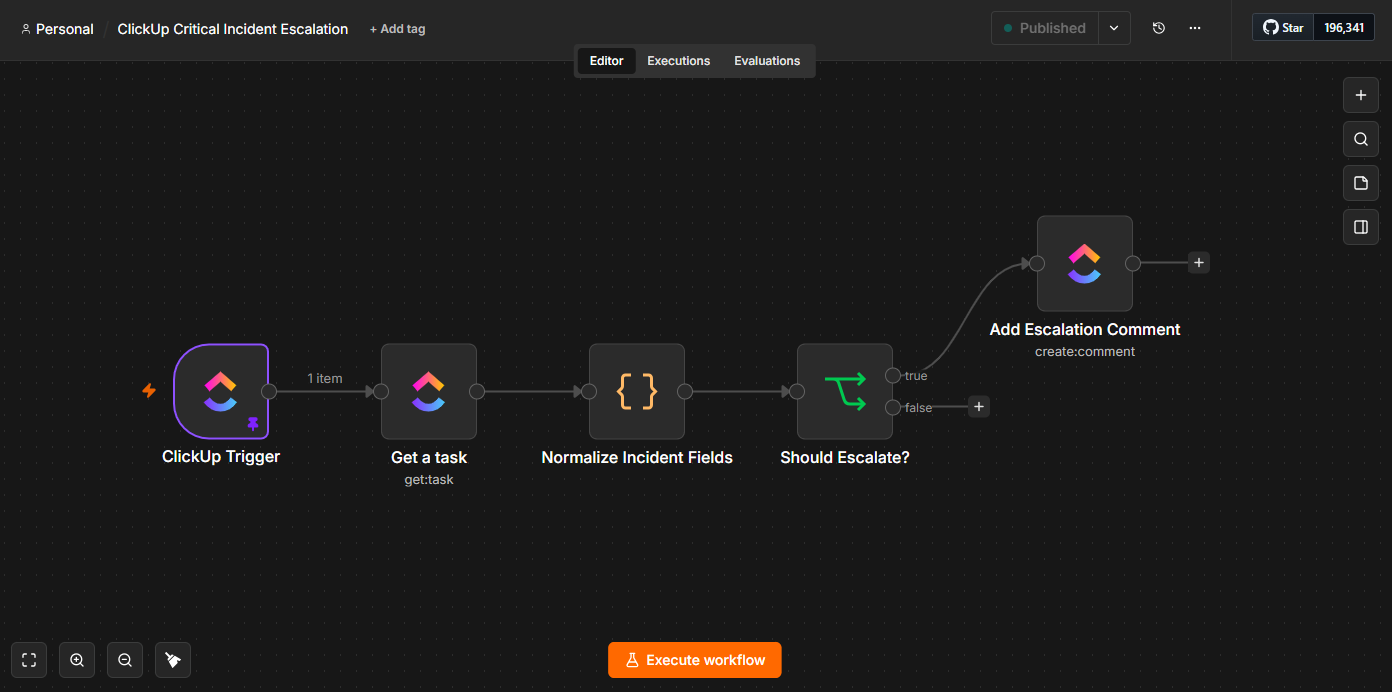
n8n automation that monitors ClickUp tasks for critical incidents, normalizes incident fields, evaluates escalation rules, and posts escalation comments to keep stakeholders informed.
INTERACTIVE WORKFLOW DEMO
Decide which incident needs escalation.
Sample rules escalate unresolved critical incidents, or high-priority incidents open for at least 60 minutes.
Illustrative rules and fictional records. Runs only in your browser; nothing is sent, saved to a server, or connected to the named services. Reloading clears this demo.
- 01Read ClickUp eventNot run
- 02Normalize incidentNot run
- 03Evaluate sample ruleNot run
- 04Preview escalation commentNot run
2. Inspect the result
Ready. Run the sample scenario to inspect its outcome.
Change an input and run again to compare the outcome. All previews remain local.
THE BUSINESS NEED
Make critical incidents visible to stakeholders
The challenge
Useful for teams that track incidents in ClickUp and need escalation decisions to follow consistent rules.
My role
I built an n8n workflow that monitors ClickUp tasks, normalizes incident fields, evaluates escalation rules, and posts escalation comments.
How the workflow works
- Monitor ClickUp tasks for critical incidents.
- Normalize the incident fields for evaluation.
- Apply the escalation rules.
- Post escalation comments to keep stakeholders informed.
WHAT THE SYSTEM DELIVERS
Incident monitoring, rule evaluation, and stakeholder updates are connected in a single escalation workflow.
n8n · ClickUp · Incident management
HAVE A SIMILAR CHALLENGE?