Make / PROJECT USE CASE
Client Onboarding – Payment Received
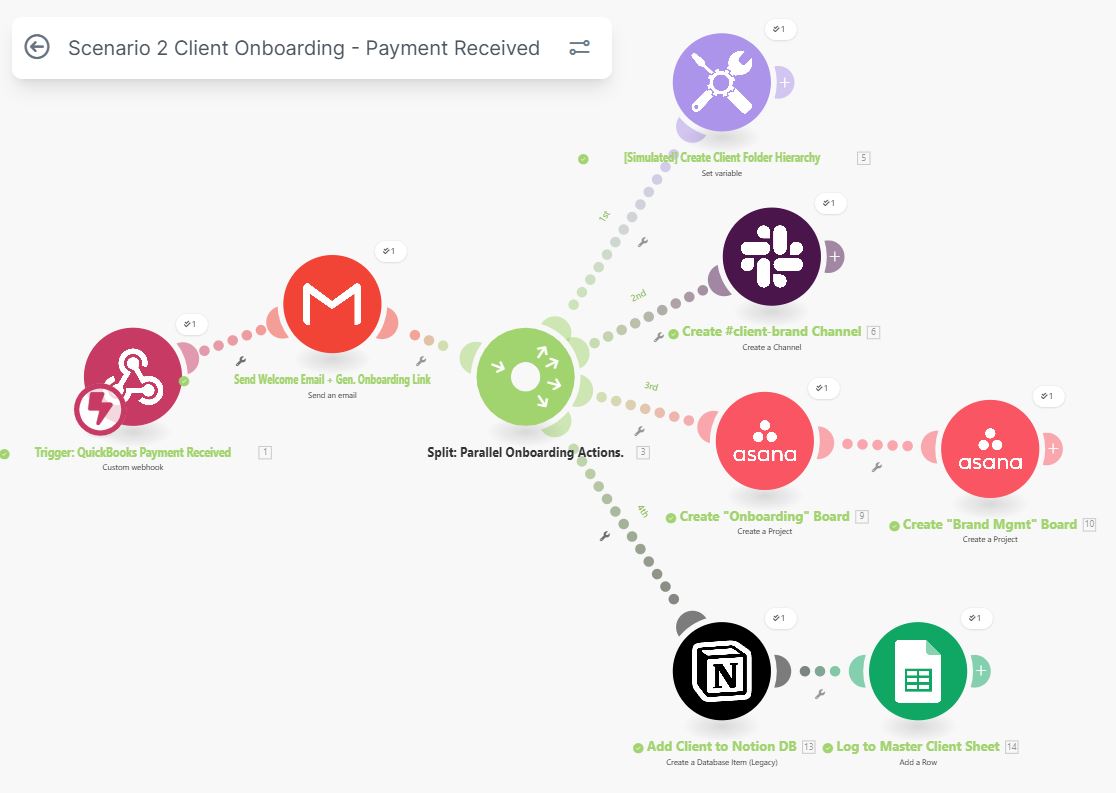
Comprehensive onboarding automation triggered by QuickBooks payment, creating Slack channels, Asana boards, Notion DB entries, and Google Sheets logging.
INTERACTIVE WORKFLOW DEMO
A payment becomes a workspace.
Switch the payment status to see which events can start the sample onboarding handoff.
Illustrative rules and fictional records. Runs only in your browser; nothing is sent, saved to a server, or connected to the named services. Reloading clears this demo.
- 01QuickBooks eventNot run
- 02Check paymentNot run
- 03Prepare workspacesNot run
- 04Log handoffNot run
2. Inspect the result
Ready. Run the sample scenario to inspect its outcome.
Change an input and run again to compare the outcome. All previews remain local.
THE BUSINESS NEED
Turn a received payment into an onboarding handoff
The challenge
Client onboarding spans finance, communication, project management, and documentation. A received payment needs to trigger the setup work across those tools.
My role
I built a Make automation triggered by a QuickBooks payment to coordinate onboarding setup in Slack, Asana, Notion, and Google Sheets.
How the workflow works
- Use a payment received in QuickBooks as the onboarding trigger.
- Create the client’s Slack channel and Asana board.
- Create the corresponding Notion database entry.
- Log the onboarding activity in Google Sheets.
WHAT THE SYSTEM DELIVERS
A payment event starts the setup across the connected tools, bringing communication, project tracking, documentation, and logging into one automated handoff.
Make · QuickBooks · Slack · Asana · Notion · Google Sheets
HAVE A SIMILAR CHALLENGE?