Make / PROJECT USE CASE
Contract → Invoice → Notification Workflow
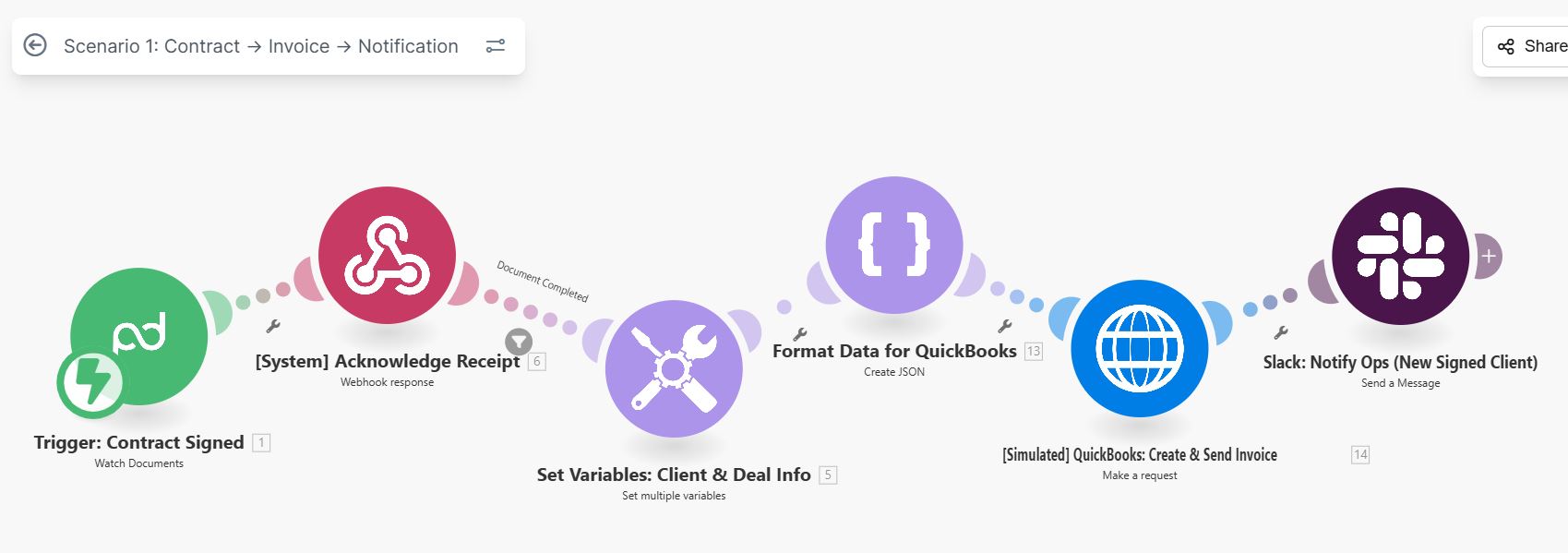
End-to-end automation that triggers upon contract signing, creates QuickBooks invoices, sets client variables, and notifies ops team via Slack.
INTERACTIVE WORKFLOW DEMO
Signed. Invoiced. Team informed.
Inspect the sample client variables, invoice, and operations message created after signing.
Illustrative rules and fictional records. Runs only in your browser; nothing is sent, saved to a server, or connected to the named services. Reloading clears this demo.
- 01Contract eventNot run
- 02Check signatureNot run
- 03Prepare QuickBooks invoiceNot run
- 04Preview Slack notificationNot run
2. Inspect the result
Ready. Run the sample scenario to inspect its outcome.
Change an input and run again to compare the outcome. All previews remain local.
THE BUSINESS NEED
Move from a signed contract to a billing handoff
The challenge
Useful when contract signing needs to initiate invoicing and inform the operations team.
My role
I built a Make workflow connecting contract signing, QuickBooks invoicing, client variables, and Slack notifications.
How the workflow works
- Trigger the workflow when a contract is signed.
- Create the QuickBooks invoice and set client variables.
- Notify the operations team through Slack.
WHAT THE SYSTEM DELIVERS
Contract signing, invoice creation, and the operations notification are connected in one process.
Make · QuickBooks · Slack · Contracts
HAVE A SIMILAR CHALLENGE?