n8n / PROJECT USE CASE
Event-Driven Self-Cleaning RAG Architecture
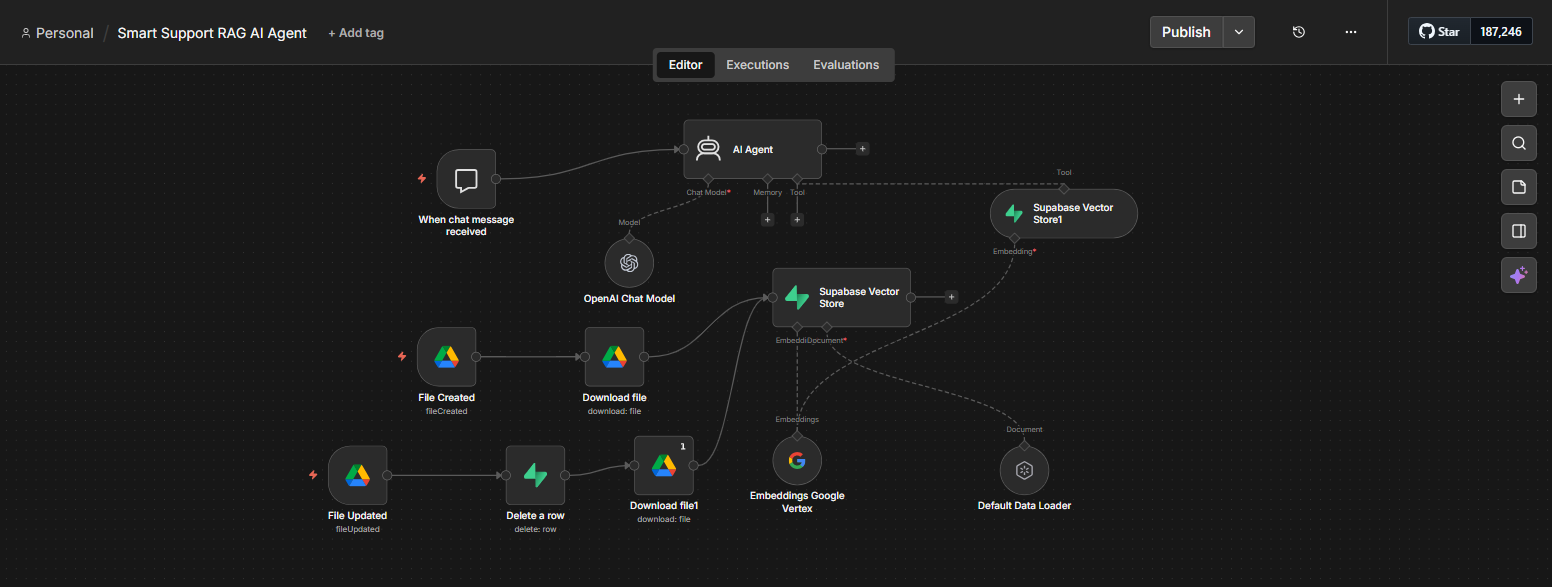
A self-maintaining knowledge base built in n8n that auto-syncs Google Drive documents into a Supabase Vector Store, deletes stale embeddings on file updates, and powers an AI Agent with always-fresh contextual retrieval.
INTERACTIVE WORKFLOW DEMO
Change the source.
See the answer change.
This demo illustrates the workflow using local document records and keyword retrieval. It does not connect to Google Drive, n8n, Supabase, or a live AI model. Changes disappear when you reload.
- 01 / SOURCEDocument changedGoogle Drive
- 02 / CLEANRemove old recordsn8n workflow
- 03 / SYNCIndex fresh contentSupabase
- 04 / RETRIEVEUse current contextAI agent
1. Edit the source
Try changing the refund window from 14 to 30 days.
Source and index are in sync.
2. Inspect the stored knowledge
The previous record is removed before the updated version is stored.
- Version
- 1
- Active records
- 1
- Old records removed
- 0
Refunds are available within 14 days of purchase. Contact support@example.com with your order number to request a refund.
- Sample policy loaded into the demo index.
3. Ask the knowledge base
Ask before syncing to see the old text, then sync and ask again.
Select “Retrieve answer” to query the indexed policy.
THE BUSINESS NEED
Keep an AI assistant’s knowledge up to date
The challenge
An AI assistant needs current reference material. When a source document changes, old embeddings can leave outdated information in the knowledge base.
My role
I built an n8n workflow connecting Google Drive, a Supabase Vector Store, and an AI agent, including logic to remove stale embeddings when files change.
How the workflow works
- Use Google Drive documents as the source knowledge.
- Synchronize document content into the Supabase Vector Store through n8n.
- Remove stale embeddings on file updates so retrieval uses the refreshed content.
- Provide the AI agent with contextual retrieval from the maintained knowledge base.
WHAT THE SYSTEM DELIVERS
The workflow maintains the connection between changing source documents and the AI agent’s retrieval store. Updating the knowledge source becomes part of the automated process.
n8n · Google Drive · Supabase · AI agent
HAVE A SIMILAR CHALLENGE?