Zapier / PROJECT USE CASE
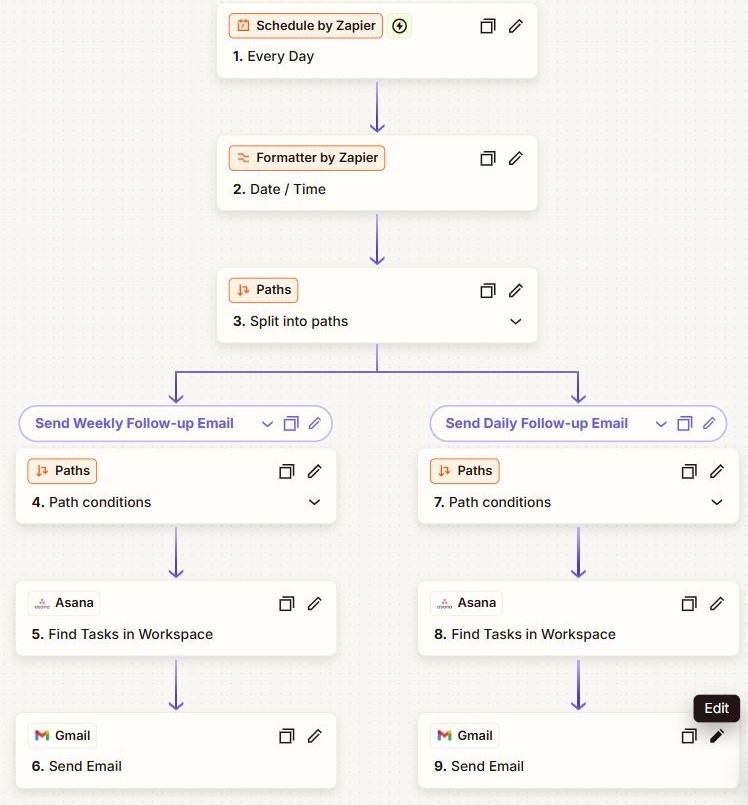
Scheduled Daily/Weekly Reporting & Task Tracker
Automated reporting system that compiles data from multiple sources and delivers scheduled insights to stakeholders.
INTERACTIVE WORKFLOW DEMO
Compile the next stakeholder update.
Calculate a report from sample task totals. The weekly view combines five identical sample workdays.
Illustrative rules and fictional records. Runs only in your browser; nothing is sent, saved to a server, or connected to the named services. Reloading clears this demo.
- 01Schedule triggerNot run
- 02Collect sample totalsNot run
- 03Calculate reportNot run
- 04Preview stakeholder updateNot run
2. Inspect the result
Ready. Run the sample scenario to inspect its outcome.
Change an input and run again to compare the outcome. All previews remain local.
THE BUSINESS NEED
Deliver recurring reports without rebuilding them each time
The challenge
Useful for teams that compile updates from multiple sources for daily or weekly stakeholder reporting.
My role
I built a Zapier reporting workflow to compile source data and deliver scheduled insights.
How the workflow works
- Run reporting on the configured daily or weekly schedule.
- Compile information from the connected sources.
- Deliver the scheduled report to stakeholders.
WHAT THE SYSTEM DELIVERS
The workflow provides a repeatable reporting cycle that brings information from multiple sources into scheduled stakeholder updates.
Zapier · Reporting · Task tracking
HAVE A SIMILAR CHALLENGE?