Make / PROJECT USE CASE
Task Completion to Xero Invoice Automation
Seamless integration that automatically generates and sends invoices in Xero upon task completion in project management tools.
INTERACTIVE WORKFLOW DEMO
Completed work becomes an invoice.
Calculate a sample invoice and see why unfinished work stays out of the billing handoff.
Illustrative rules and fictional records. Runs only in your browser; nothing is sent, saved to a server, or connected to the named services. Reloading clears this demo.
- 01Task eventNot run
- 02Check completionNot run
- 03Calculate invoiceNot run
- 04Preview Xero handoffNot run
2. Inspect the result
Ready. Run the sample scenario to inspect its outcome.
Change an input and run again to compare the outcome. All previews remain local.
THE BUSINESS NEED
Connect completed work to invoicing
The challenge
Useful for service teams where completing a project-management task should start the invoicing process.
My role
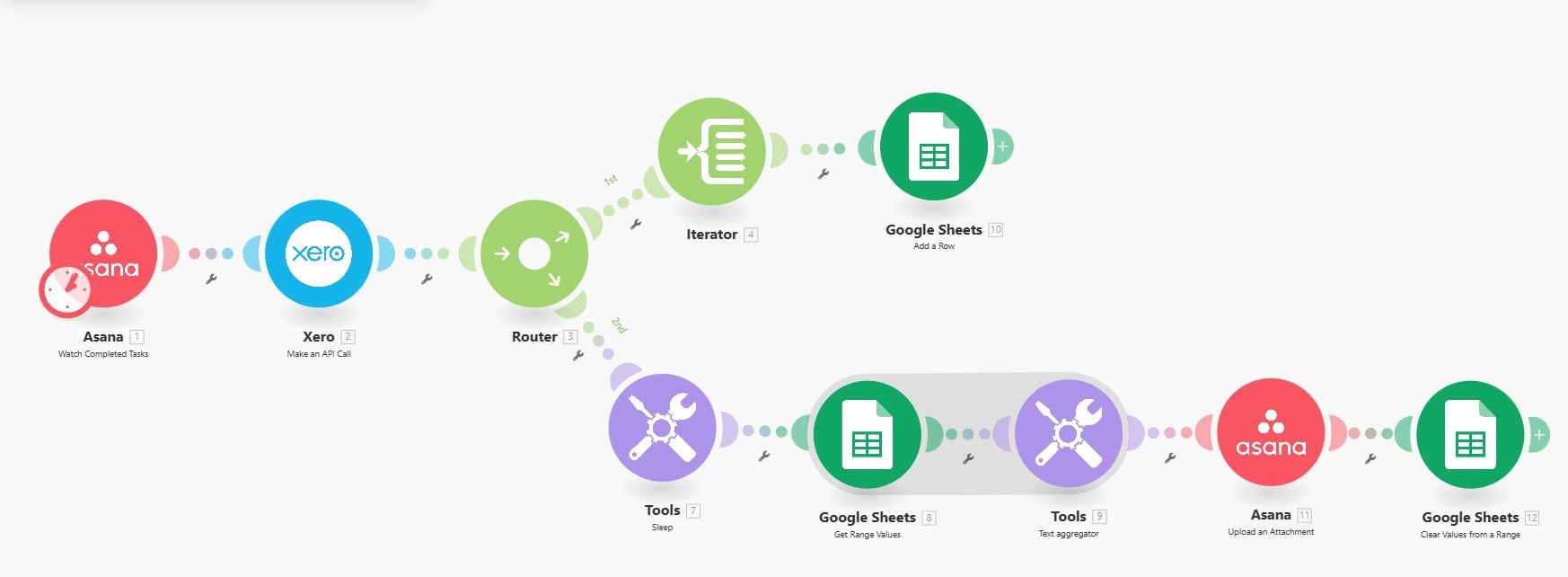
I built a Make integration connecting task completion in project-management tools to invoice generation and sending in Xero.
How the workflow works
- Use task completion as the trigger.
- Generate the corresponding invoice in Xero.
- Send the invoice through the automated workflow.
WHAT THE SYSTEM DELIVERS
Completed work can move into the billing process through a connected workflow instead of a separate manual handoff.
Make · Xero · Project management
HAVE A SIMILAR CHALLENGE?