GoHighLevel / PROJECT USE CASE
Universal Lead Intake & Automation System
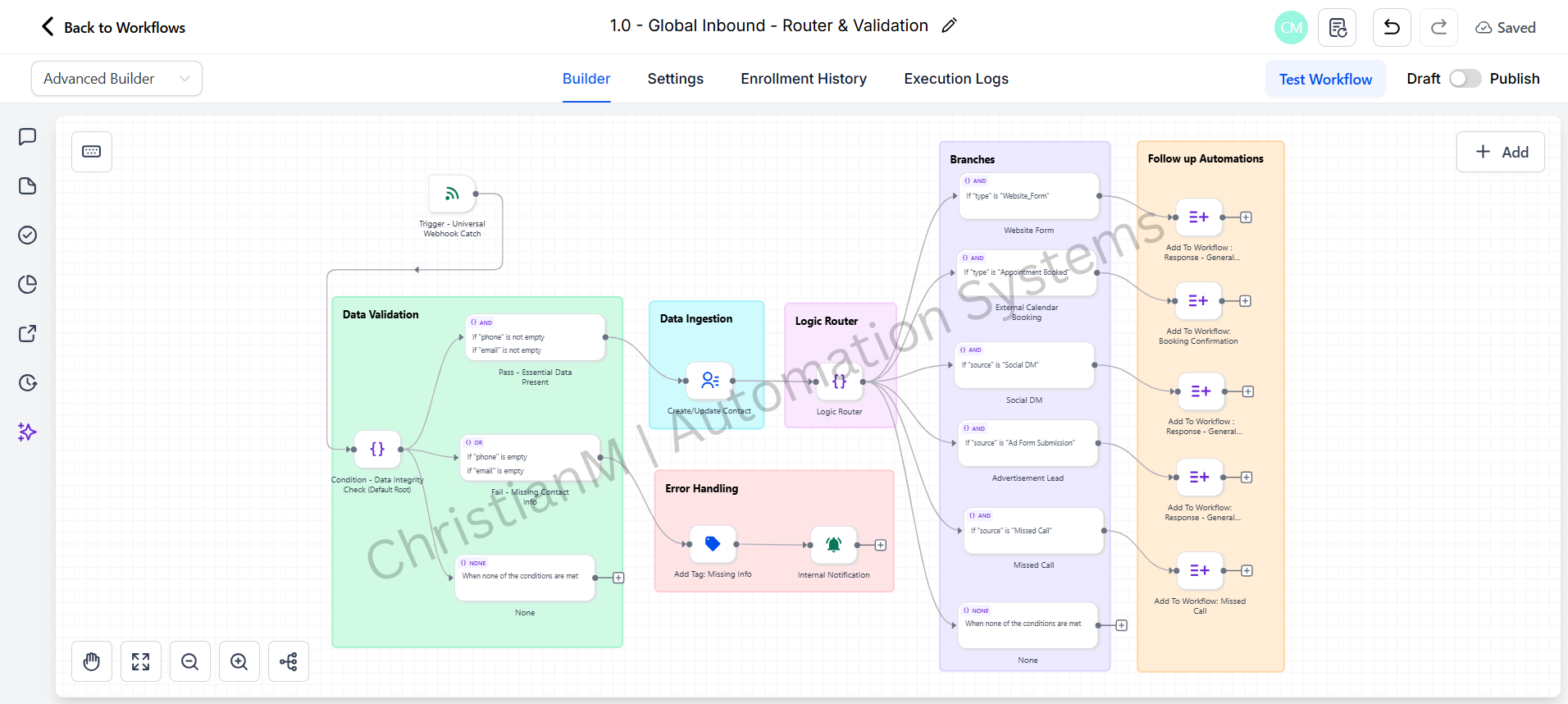
A centralized logic engine designed to normalize, validate, and route high-volume lead traffic from disparate sources (Webhooks, API, Calendly) before it enters the CRM pipeline.
INTERACTIVE WORKFLOW DEMO
Many sources. One clean lead.
Normalize sample contact data and inspect the validation gate before CRM intake.
Illustrative rules and fictional records. Runs only in your browser; nothing is sent, saved to a server, or connected to the named services. Reloading clears this demo.
- 01Receive sourceNot run
- 02Normalize fieldsNot run
- 03Validate contactNot run
- 04Route to CRMNot run
2. Inspect the result
Ready. Run the sample scenario to inspect its outcome.
Change an input and run again to compare the outcome. All previews remain local.
THE BUSINESS NEED
Give every lead a consistent path into your CRM
The challenge
Leads can arrive through webhooks, APIs, and Calendly in different formats. Those inputs need a consistent structure and validation before entering the CRM pipeline.
My role
I designed a centralized intake logic engine to normalize, validate, and route incoming leads before they enter the GoHighLevel pipeline.
How the workflow works
- Receive lead information from webhooks, APIs, and Calendly.
- Normalize the incoming information into a consistent structure.
- Validate the data before routing it onward.
- Route the lead into the CRM pipeline through the centralized intake logic.
WHAT THE SYSTEM DELIVERS
Lead sources feed into one intake system, giving validation and routing a defined place before CRM entry. The workflow is designed to support high-volume lead traffic from multiple sources.
GoHighLevel · Webhooks · APIs · Calendly
HAVE A SIMILAR CHALLENGE?